
As drones move from individual flights to ongoing operations, the questions a ground station must answer are changing: which aircraft are ready for a task, how people coordinate, how exceptions are handled, and how operations leave records that can be reviewed.
For teams seeking drone software support, the interface is only the starting point. A useful ground station connects equipment status, mission planning and human judgment. Drawing on public technical references and MERIVUS's ground station development direction, this article explores changes worth watching and how we provide customization for specific projects.
Where Are Ground Stations Heading?
From monitoring one aircraft to managing a mission
QGroundControl already lists multi-vehicle management among its features. DJI FlightHub 2 also combines remote control, route management and flight scheduling in a single operations platform.[1][2] These publicly documented products show ground station functions expanding from individual flight operations to mission coordination.
We expect the next focus to be on completing missions continuously: whether aircraft are ready, how tasks are assigned, who handles exceptions, and when actions need confirmation. As fleet size grows, clear task status and responsibilities will matter more than simply adding information to the screen.
From a general interface to specific workflows
Ground station requirements vary by project. Surveying teams focus on flight routes and data collection, equipment development teams on parameters, telemetry and debugging records, while inspection teams may need to pass mission results to existing business systems.
DJI Cloud API provides interfaces between devices and business platforms through protocols such as MQTT, HTTPS and WebSocket, illustrating this direction.[3] For custom projects, we focus on how aircraft, people and business systems exchange information. Integration feasibility requires checking each interface and the range of supported equipment.
Local AI assistance makes information easier to understand
Local model tools already offer ways to run models on the device and disable cloud features.[4] This offers technical options for adding status explanations, operational Q&A and information organization to a ground station. For projects with limited connectivity or local data processing requirements, local deployment is worth assessing.
We see practical near-term AI applications in helping operators understand information, identify items that need checking and develop recommendations. There must still be a clear process to assess whether a recommendation is correct, whether the equipment is ready to execute it and who can authorize the action. Local AI does not make the entire system offline; maps, video and external services must be assessed separately.
From executing operations to validation and review
PX4's official documentation describes software-in-the-loop, hardware-in-the-loop and failsafe simulation methods for checking system behavior before real flights.[5] This demonstrates that validation is itself an important part of integrating a ground station with a flight controller.
Future ground stations are also likely to place greater emphasis on mission records, causes of anomalies, operator confirmations and version information. We expect closer integration of simulations, logs and reports to become an important direction, helping teams trace both what happened and the information behind each decision.
MERIVUS: planning software support around project requirements
美利威瑟(温州)工业科技有限责任公司 focuses on propulsion systems, precision equipment and safety resources. For drone-related projects, ground station software forms part of our supporting services. We discuss custom development based on equipment conditions and operating workflows.
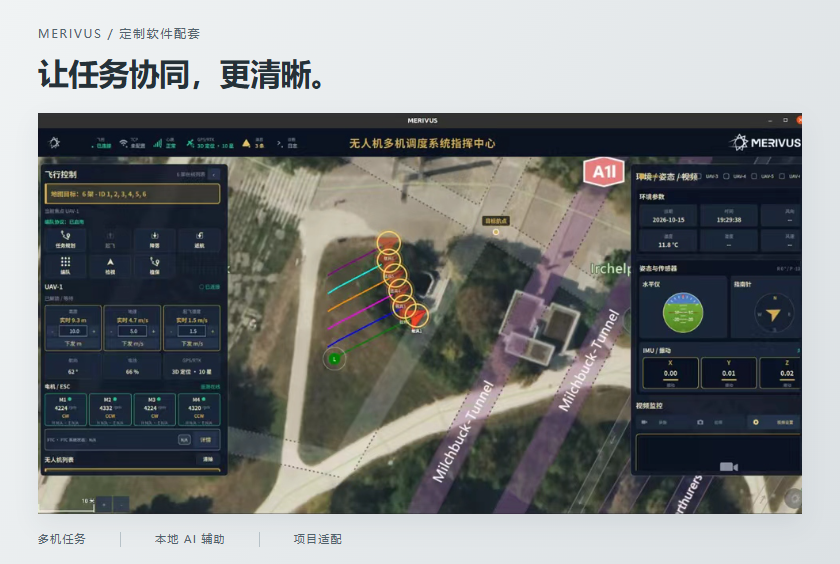
MERIVUS GroundStation is developed on the QGroundControl technology framework. Current development materials cover branded interfaces, multi-vehicle status summaries, mission drafting and review, local AI assistance, event logs, archives and reports. These provide an engineering foundation for project-specific adaptation.
This article describes MERIVUS's ground station customization direction and engineering foundations. The materials reviewed cover source code and engineering documentation. Project-specific software still requires building, device integration testing and acceptance checks. Features, supported equipment and deliverables are subject to the project agreement.
AI recommendations and actual flight operations are handled separately
In the current design, local models provide answers, explain status and generate structured recommendations. Recommendations are checked against local format, allowlist and risk rules before operator review. The AI recommendation pipeline does not execute flight actions directly; actual flight operations follow a separate, controlled process.
- 01The model generates recommendationsQuestions, explanations and information organization
- 02Local rule validationFormat, allowlists and risk checks
- 03Operator reviewReview the basis and applicable conditions
Actual flight operations use a separate, controlled process.
A local model solution requires the model and runtime to be prepared in advance. Local inference does not depend on a cloud model API Key. Data storage, map sources, external interfaces and network settings will each be specified in the deployment plan.
Where can a custom service begin?
We can assess requirements in the following areas and document feasible scope, dependencies and acceptance criteria in the project proposal.
- 01Interface and operating workflow
- Discuss brand identity, a Chinese-language interface, page layout and information hierarchy. Map common actions, task reviews and prompts to the needs of each operating role.
- 02Device & Mission Adaptation
- Review aircraft types, flight controllers, firmware versions, communication messages and payload data. Assess multi-vehicle status views, mission templates, mission drafts and human confirmation workflows.
- 03Local AI assistance
- Assess local Q&A, status explanations and how suggestions are presented against the computer specifications, model requirements and available information. Define what information AI may read and what operations it must not perform.
- 04Data and system integration
- Define the events, logs and report fields to retain, and assess file exchange or third-party interfaces. Cross-site collaboration, account permissions and external system integration require separate agreement on the development scope.
- 05Source Code & Engineering Handover
- Prepare source code, configuration instructions and handover documents as agreed. Define responsibilities for software builds, device integration, simulation and field validation, together with deliverables and acceptance criteria.
For a multi-device mission dashboard, for example, first define the core needs: device status, mission lists, review records and output files. Then decide whether to add AI assistance or connections to business systems.
Prepare these details to start a project discussion
- Applications and tasksThe work you plan to do, problems in your current workflow, and what you want the software to help accomplish.
- Devices & InterfacesAircraft types, quantities, flight controllers, firmware versions, payloads and available protocol or interface documents.
- Operating environmentComputers and operating systems in use, on-site network conditions, and whether local deployment and offline maps are needed.
- Delivery and validationWhether you need source code or a software release, the schedule, who supplies test equipment and how project completion will be assessed.
The long-term value of a ground station comes from clear, ongoing coordination between software and real missions. Starting with specific requirements, MERIVUS aims to make device status easier to understand, mission processes easier to verify and future expansion grounded in clear engineering information.
Contact MERIVUS to discuss ground station customization
Phone / WeChat:15356877933
Business email:sales@merivusco.com
Support hours: 08:00–24:00 (Beijing time)
References
The industry directions discussed are an analysis based on the public technical references below, not a forecast of market growth. External products illustrate technical directions and do not imply that MERIVUS has integrated them. References checked: 2026-10-20.
- QGroundControl · User guide and feature overview
- DJI FlightHub 2 · Operations management and flight scheduling
- DJI Cloud API · Product Overview
- Ollama · Local operation and cloud feature settings
- PX4 · Simulation & Validation;Failsafe simulation
Software interfaces in the page illustrations come from promotional materials supplied by MERIVUS. They illustrate interface direction and are not evidence for acceptance of current-version features or real-flight performance.
Ground station customization FAQs
What ground station software customizations can be assessed?
Requirements can be assessed for interface workflows, device and mission adaptation, local AI assistance, logs and reports, third-party interfaces and source code delivery. The available materials establish a source code and engineering design foundation. Scope, integration testing conditions and delivery standards must be agreed for each project.
Will the ground station's local AI control the aircraft directly?
The current design uses AI for answers, explanations and recommendations, with local rule checks and operator review. Actual flight operations follow a separate controlled process. Local AI inference does not mean maps, video and all other functions can work offline. Deployment and validation scope must be confirmed for each project.
Discuss Software Customization · Explore MERIVUS Power & Joint Products